Page 1 of 1
can't connect to mysql host after windows update
Posted: Wed May 16, 2018 5:37 am
by drtbar
Come in this morning and half of my clients cannot connect to the sql server on the server box. After a restart all but one was able to connect. The server updated last night and it seems 10% of the time when windows updates, it breaks something on my network.
The box that I still cannot get to connect can connect to the server via windows explorer with the path \\server, but opendental cannot connect for some reason. I've tried running as administrator and restarted 3 times.
Any suggestions?
Re: can't connect to mysql host after windows update
Posted: Wed May 16, 2018 7:19 am
by drtbar
I was able to get it going, but don't really have a definitive solution. With the help of James on chat support, I tried typing the ip of the server to get past connecting to the mysql server screen, then it hung on looking for a-z folder, which it would not accept the "ip\opendentimages" so I went back to the default "\\server" and it worked. No idea why it hung to begin with or why the same setting before all of a sudden worked. Just to let others know what worked for me. Hopefully it helps someone else.
Re: can't connect to mysql host after windows update
Posted: Wed May 16, 2018 10:40 am
by wjstarck
Shouldn't it have been \\IP\opendentimages?
Re: can't connect to mysql host after windows update
Posted: Wed May 16, 2018 2:22 pm
by Tom Zaccaria
I have had this problem from time to time after an update. Very frustrating.
I usually just Right click on the Start Menu, Select File Explorer, Navigate to our server which is the 'F' drive.
The server usually has a red 'X' over it which means the local machine is not connected to the server. I right click on the server, the red 'X' goes away and OD behaves as normal.
Hope this helps.
drtmz
Re: can't connect to mysql host after windows update
Posted: Mon May 21, 2018 10:04 am
by psculldmd
I am having this same problem but, nothing is working to reconnect to the MySQL server.
Anyone else have a solution?
Thanks
Re: can't connect to mysql host after windows update
Posted: Mon May 21, 2018 11:02 am
by jsalmon
For whatever reason my MySQL service didn't automatically start after the most recent Windows Update and I had to manually go into my Services and start the MySQL service.
Re: can't connect to mysql host after windows update
Posted: Mon May 21, 2018 11:14 am
by psculldmd
MySQL service is up and running, OD works fine on computers not updated. Only the 2 computers with the spring update can not connect.
Re: can't connect to mysql host after windows update
Posted: Tue May 22, 2018 7:21 pm
by Tabakdds
I have the same problem after windows update. Half of my client computers are working, half are not connecting, even though I can see all the files on the server. I tried everything from reinstalling client version, restarting the client PC, I ran compatibility to version 8, then after clicking ok several times the computer randomly connects. I wish I knew the sequence of what needs to done in order to fix it. If anyone knows definitive solution please post it. Thank you.
Re: can't connect to mysql host after windows update
Posted: Sat May 26, 2018 10:34 am
by rhaber123
Thiis is a network issue, not OD ISSUE.
Option 1
ON YOUR SERVER, find the ip address of the server,
and on your workstations, when you start OD and you enter the database location screen in OD, enter the ip address instead of entering the name of the server
Option 2, and for a permanent solution
ON YOUR ROUTER,
you can specify that your server will ALWAYS have the same IP address that you will assign to it.,
There are a lot of instructions on youtube that shows you how to assign an ip address to a computer on your router
AND ON YOUR WORKSTATIONS
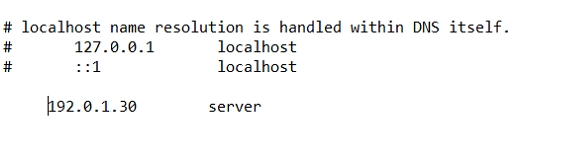
go to C:\Windows\System32\drivers\etc\hosts , and in the "hosts" text file you can add the ip address of the server and its name.
This will allow window to know that your"server' has that specific IP address.
But to add it, you MUST
edit the hosts file as an ADMINISTRATOR.it means right click on notepad, and open it as an administrator, and save it after.
Re: can't connect to mysql host after windows update
Posted: Sat Jun 02, 2018 6:41 pm
by tomql
I have the same problem. None of my client terminals is able to connect to MySQL hosts. I tried entering IP address to the server name and it is still not working. Does anyone have a suggestion?
Thanks.
Re: can't connect to mysql host after windows update
Posted: Mon Jun 04, 2018 12:03 pm
by tgriswold
We've had a few different issues and solutions here on this forum so i'm going to try and point you in the right direction of where to troubleshoot if you're having an issue. As always, if you are still having issues you can contact support and we'll do our best to help you.
1.) No workstations are able to connect.
- Check to make sure mysql is running on the server. If it isn't you may need to start it manually, or see if restarting the server machine fixes the issue.
- Try connecting to the server using IP address rather than computer name. If this works and you want to use computer name, flushing DNS may work, or see rhaber123's post above to edit the hosts file to override it.
- Check if you have connection issues between your workstation and the server. Can you browse to the server? Can you ping the server? This is likely a networking issue, contact your IT.
2.) Some workstations are able to connect but not others.
- Try connecting to the server using IP address rather than computer name. If this works and you want to use computer name, flushing DNS may work, or see rhaber123's post above to edit the hosts file to override it.
- Check if you have connection issues between your workstation and the server. Can you browse to the server? Can you ping the server? This is likely a networking issue, contact your IT.
3.) OD is able to connect to server but is hanging on startup looking for A-Z folder.
- If you are using a network drive as the A-Z folder path, try using a full directory path instead (\\server\blah folder\ rather than \\NetworkDriveA\
Re: can't connect to mysql host after windows update
Posted: Mon Jun 04, 2018 11:28 pm
by erik
The recent Windows update triggered a bunch of problems at our office, too. It showed up after hours and seemed to have broken our whole network. Not fun. This was not an Open Dental issue, but as always, OD support was graciously helpful in resolving.
Ultimately, what worked for us was:
- Modifying everything within Open Dental that pointed to our server and replacing it with the server IP address 192.168.XXX.XXX. This includes location of the database and the OpenDentImages folder.
- Adding a single line of code at the end of our my.ini file, "skip-name-resolve" (without the quotes)
This has to be done on every workstation and this approach will break if your server IP isn't static. Doing something similar also fixed our issues with our digital imaging software, XDR.
Given the number of similar networking issues with many other programs (e.g. Sonos), my guess is that the problem stems from something related to Microsoft disabling SMB 1.0 with the latest update. But that's no more than a guess.
Re: can't connect to mysql host after windows update
Posted: Tue Jun 05, 2018 11:41 am
by stjames70
After the latest Feature update to Windows 10, version 1803, some of my workstations refused to connect to the server.
I called Open Dental support, and they solved it within a few minutes.
Instead of using all capital letters for the server name, we switched to all lower case and voila, it connected to the server.
Now, the behavior was inconsistent as some of the workstations did not develop the inability to connect to the server database.
So we only switched to lower case when we had a problem with a particular workstation, but that ended up working on the problematic workstations.
Re: can't connect to mysql host after windows update
Posted: Tue Jun 05, 2018 12:09 pm
by Justin Shafer
I had an office with this issue.. the doc tried to fix it himself which to me just mucks up the waters.. I ended up just taking a freshly loaded computer and comparing the services startup type and programs and features (he installed SMB1)... not really sure what happened honestly... but so far it seems okay.....
??????
Re: can't connect to mysql host after windows update
Posted: Wed Jun 06, 2018 1:18 pm
by teethdood
Windows messes up IPv6 support for certain ethernet/wifi cards. Try disabling IPv6 and using only IPv4.
Re: can't connect to mysql host after windows update
Posted: Fri Jun 08, 2018 3:08 pm
by Justin Shafer
I have found that on networks that don't have Server 2016 and a domain....
That this seems to help:
Setting these services to automatic instead of enabling SMB1...
DNS Client
Function Discovery Resource Publication
SSDP Discovery
UPnP Device Host
At least that fixes Network Discovery issues with 1803...
Re: can't connect to mysql host after windows update
Posted: Thu Jun 14, 2018 1:18 pm
by ejanson
I have the opposite solution to stjames70 above. I can access my server by now using all capitals to log in, instead of all lower case which I've always used in the past. Thanks for the clue, stjames70!
Re: can't connect to mysql host after windows update
Posted: Fri Jun 15, 2018 10:05 am
by dgraffeo
Sometimes it really seems that there's some shadowy figure sitting behind a desk at Microsoft laughing maniacally while he flips random switches. These switches control various aspects of how Windows works.
Re: can't connect to mysql host after windows update
Posted: Sun Jul 22, 2018 9:10 pm
by pid_user
stjames70 wrote:
Instead of using all capital letters for the server name, we switched to all lower case and voila, it connected to the server.
thanks for sharing. It helped me too.
Re: can't connect to mysql host after windows update
Posted: Fri Sep 14, 2018 5:30 am
by drtbar
Any other updates? The most recent issue I've been having is I can connect to the server first thing in the morning, and then after a few minutes, I get the error "lost connection to mysql server." Then I'm forced to exit the program and restart the program and it connects fine. Is it time to move to a true server OS?