ONLINE SCHEDULING, Sync OD Appointments with Google Calendar
Posted: Sat Dec 12, 2015 5:22 pm
Updated June 10, 2016
1- Patients can schedule their appointments online
2- Me and my hygienist can check our schedules, with the patients names, phone numbers and emails, and at any time, by just logging in Google Calendar:
- We can see who is our first patient for the next day and at what time, and contact that patient if needed
- We can see the day before schedule, with the patients names, phone numbers and emails, and follow up with theses patients
ETC........
=========================================================================================
I - Sync OD Appointments with Google Calendar :
Plugin trial version and instructions available here: http://www.mopensoft.com/others
instructions: http://mopensoft.blogspot.com.au/2016/0 ... ental.html
Backup your data first, and try it on your home computer first.
1- Create Calendars:
in your google calendar account, create calendars with the "same name " as your operatories --- MUST BE THE SAME SPELLING
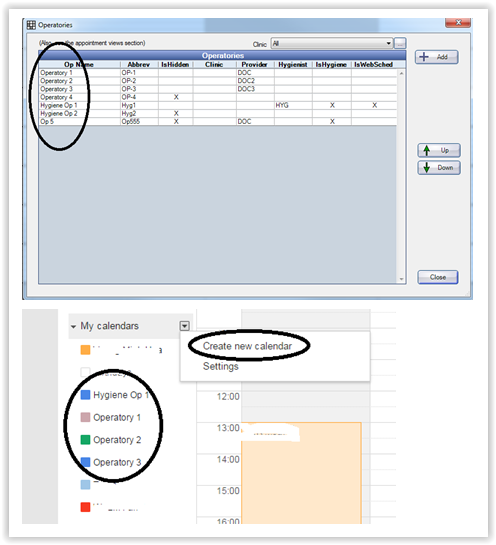
2- Download the plugin:
a- download the "Required DLLs", unzip them and place them in your OD folder (C / program files (x86)/OpenDental)
https://www.dropbox.com/sh/6mqklvxpbii9 ... 0DLLs?dl=0
b- download the "Plugin File" that matches your OD version:
https://www.dropbox.com/sh/6mqklvxpbii9 ... Files?dl=0
+ delete the version number at the end of the plugin, it means rename the plugin to: mopensoft.odplugins.apptsync.dll
+ and place it again in your OD folder (C / program files(x86)/OpenDental)
if you have an older version of OD , try this one : mopensoft.odplugins.apptsync15.4.52.dll
(it did work with OD version 15.3) I am not sure if it will work with much older versions.
3-Setup the Plugin:
in OD go to Setup > Program Links> Add , and follow the instructions in the manual
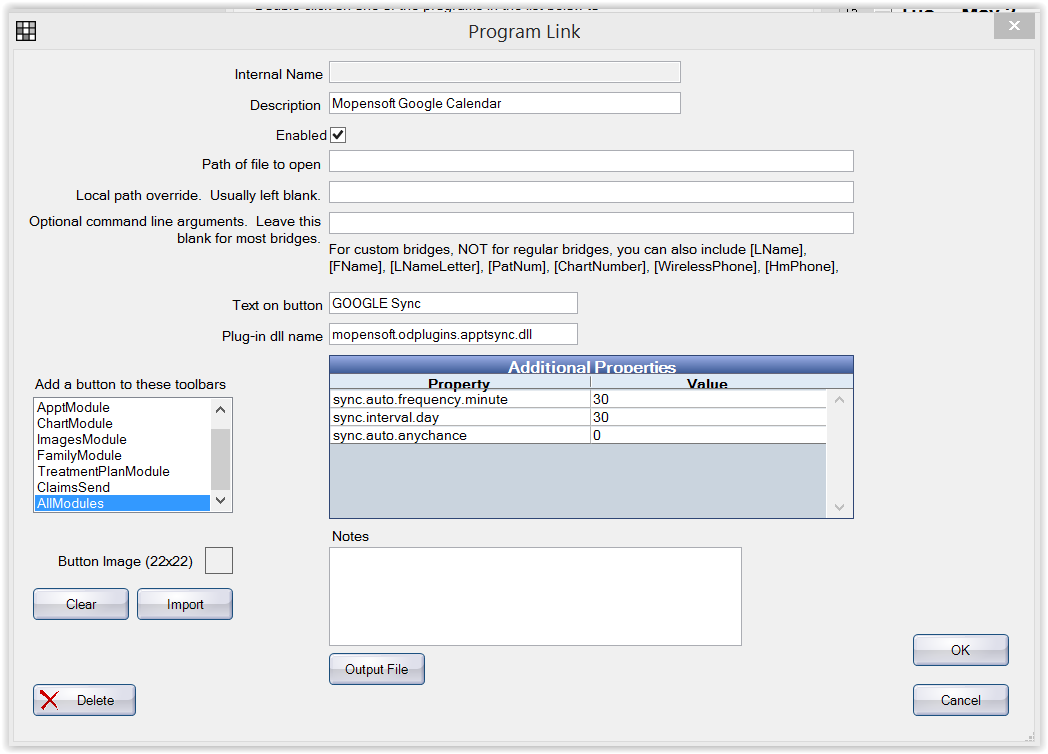
4- First time sync (this will happen one time only):
(be sure that no other google account is open in the background OR IN A DIFFERENT BROWSER)
Log out of OD and login again. Now when you rerun Open Dental, it will connect to your default browser (internet explorer in my case..) and will ask you to login into YOUR google account, and as you enter the correct username and password of the google account that has the correct calendars created in it, it will ask you for permission, just click on "ALLOW"
=============================================================================================================================
UNINSTALL
If your license expire, OD will stop working
1- On your workstation, go to C/program files (x86)/OpenDental
look for this plugin: mopensoft.odplugins.apptsync.dll
just delete the plug in or rename it, and Open Dental will work without any problem.
(or Cut it and Paste it into another folder)
2- Or if any other computer is working, in Open Dental, just go to SETUP/Program Links
find the plugin name, click on it, and disable it
To buy a license, follow this link, provide your info, and you will be contacted
http://www.mopensoft.com/pricing
=============================================================================================================================
II - ONLINE SCHEDULING
Now I want to share with you how I am using the ONLINE scheduling with http://www.simplybook.me
(or you can use any other similar service)
- Mopensoft plugin will allow OD to sync to Google Calendar (automated and manual sync options available)
- Google Calendar will sync to simplybook.me (or any other provider) - ..... simplybook.me offer 2 ways sync with google calendar and not just integration with google calendar.
- Email is sent from simplybook.me to the provider informing the office that a booking is made.
- In OD, you get a pop up that an appointment was made online
- Front office enter the appointment in OD,
- and Mopensoft plugin autosync, will sync OD to Google Calendar again
All done automatically once these setups are done
http://www.simplybook.me offer one month free trial to test their services.
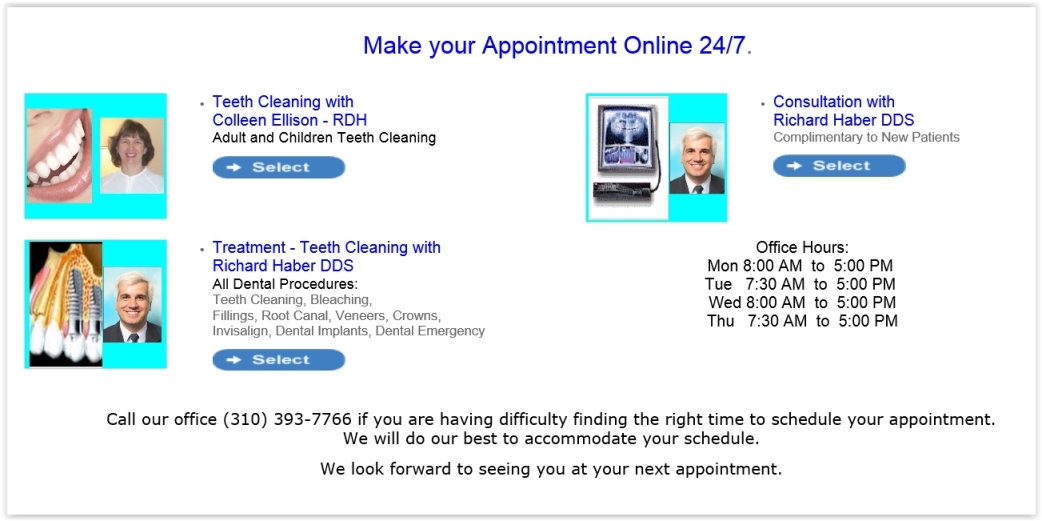
Through http://www.simplybook.me I was able to create these options
============================================================================================================================
============================================================================================================================
III - Telling your patients about THIS ONLINE BOOKING is always the missing part.
1- We sent an email to all of our active patients telling them about the "New Online Scheduling" that is available to them now
Subject: NEW Online Scheduling - Book Online your next dental appointment!
We are happy to inform you that you can now book your appointment online with our office 24/7. This option is available on our webpage http://www. {URL}
Call our office (123) 456-7890 if you are having any difficulty finding the right time to schedule your appointment.
We will do our best to accommodate your schedule.
We look forward to seeing you at your next appointment.
2- In all of the recall template Email messages we added this message too:
"New Online Scheduling is available now 24/7 on our webpage {URL} "
from the main Menu, go to Setup/ Appointments/ Recall
We mainly sent it to those patients who are overdue for recall,
3- we added that also to the Text messaging and Email "CONFIRMATIONS" templates
so patients will know that online scheduling is available to them now
"New Online Scheduling is available now 24/7 on our webpage {URL} "
4- we added it to the message that is sent on the recall reminders post cards too
(if we do not have a patient email or cell phone number)
5- we added it at the bottom of our signature in any email sent to patients:
The office of john Doe DDS
12345 street
City CA 98765
Tel: (123) 456-7899
http://www.doctor.com
***Book your next dental appointment online 24/7 by going to our webpage http://www.doctor.com/online.htm or call our office Tel: (123) 456-7899
.
6- " I " tell every patient that comes to our office that next time they can try it and give us their feed back
7- Made a special appointments options on our contact webpage mainly for NEW PATIENTS to use it (photo above)
Easier for the new patients to schedule their appointment
===========================================================================================================
TEXT MESSAGING FROM INSIDE OPEN DENTAL
viewtopic.php?f=1&t=6266
============================================================================================================
Open Dental offer ON LINE SCHEDULING too, more about their E-services available here:
http://www.opendental.com/manual/eservices.html
Contact Open Dental for monthly fees. See Fees for Software, Support, and Services:
http://www.opendental.com/manual/fees.html
===========================================================================================================
===========================================================================================================
Minh started few months ago working on a plugin that will allow dentists to sync OD Appointments with outlook calendar,
He was successful but it still needs work to be finalized.
I asked him if that can be done with Google Calendar, and he is working on this now. He may have something ready by the end of the year, but any feedback about what each office need will be helpful. Please reply to this post and ad what you need for this plugin to accomplish for your office.
for example:
1 - Should apply to Multiple Schedules
2- do you prefer an auto sync or a manual sync
3 - cost for a one year subscription to the plugin should cost
4- you prefer to sync with Outlook Calendar or Google Calendar
5- your office need..........
etc.......
etc.......
previous REQUESTS:
viewtopic.php?f=1&t=2947&p=23231&hilit= ... dar#p23231
viewtopic.php?f=1&t=5931&p=25965&hilit= ... dar#p25965
1- Patients can schedule their appointments online
2- Me and my hygienist can check our schedules, with the patients names, phone numbers and emails, and at any time, by just logging in Google Calendar:
- We can see who is our first patient for the next day and at what time, and contact that patient if needed
- We can see the day before schedule, with the patients names, phone numbers and emails, and follow up with theses patients
ETC........
=========================================================================================
I - Sync OD Appointments with Google Calendar :
Plugin trial version and instructions available here: http://www.mopensoft.com/others
instructions: http://mopensoft.blogspot.com.au/2016/0 ... ental.html
Backup your data first, and try it on your home computer first.
1- Create Calendars:
in your google calendar account, create calendars with the "same name " as your operatories --- MUST BE THE SAME SPELLING
2- Download the plugin:
a- download the "Required DLLs", unzip them and place them in your OD folder (C / program files (x86)/OpenDental)
https://www.dropbox.com/sh/6mqklvxpbii9 ... 0DLLs?dl=0
b- download the "Plugin File" that matches your OD version:
https://www.dropbox.com/sh/6mqklvxpbii9 ... Files?dl=0
+ delete the version number at the end of the plugin, it means rename the plugin to: mopensoft.odplugins.apptsync.dll
+ and place it again in your OD folder (C / program files(x86)/OpenDental)
if you have an older version of OD , try this one : mopensoft.odplugins.apptsync15.4.52.dll
(it did work with OD version 15.3) I am not sure if it will work with much older versions.
3-Setup the Plugin:
in OD go to Setup > Program Links> Add , and follow the instructions in the manual
4- First time sync (this will happen one time only):
(be sure that no other google account is open in the background OR IN A DIFFERENT BROWSER)
Log out of OD and login again. Now when you rerun Open Dental, it will connect to your default browser (internet explorer in my case..) and will ask you to login into YOUR google account, and as you enter the correct username and password of the google account that has the correct calendars created in it, it will ask you for permission, just click on "ALLOW"
=============================================================================================================================
UNINSTALL
If your license expire, OD will stop working
1- On your workstation, go to C/program files (x86)/OpenDental
look for this plugin: mopensoft.odplugins.apptsync.dll
just delete the plug in or rename it, and Open Dental will work without any problem.
(or Cut it and Paste it into another folder)
2- Or if any other computer is working, in Open Dental, just go to SETUP/Program Links
find the plugin name, click on it, and disable it
To buy a license, follow this link, provide your info, and you will be contacted
http://www.mopensoft.com/pricing
=============================================================================================================================
II - ONLINE SCHEDULING
Now I want to share with you how I am using the ONLINE scheduling with http://www.simplybook.me
(or you can use any other similar service)
- Mopensoft plugin will allow OD to sync to Google Calendar (automated and manual sync options available)
- Google Calendar will sync to simplybook.me (or any other provider) - ..... simplybook.me offer 2 ways sync with google calendar and not just integration with google calendar.
- Email is sent from simplybook.me to the provider informing the office that a booking is made.
- In OD, you get a pop up that an appointment was made online
- Front office enter the appointment in OD,
- and Mopensoft plugin autosync, will sync OD to Google Calendar again
All done automatically once these setups are done
http://www.simplybook.me offer one month free trial to test their services.
Through http://www.simplybook.me I was able to create these options
============================================================================================================================
============================================================================================================================
III - Telling your patients about THIS ONLINE BOOKING is always the missing part.
1- We sent an email to all of our active patients telling them about the "New Online Scheduling" that is available to them now
Subject: NEW Online Scheduling - Book Online your next dental appointment!
We are happy to inform you that you can now book your appointment online with our office 24/7. This option is available on our webpage http://www. {URL}
Call our office (123) 456-7890 if you are having any difficulty finding the right time to schedule your appointment.
We will do our best to accommodate your schedule.
We look forward to seeing you at your next appointment.
2- In all of the recall template Email messages we added this message too:
"New Online Scheduling is available now 24/7 on our webpage {URL} "
from the main Menu, go to Setup/ Appointments/ Recall
We mainly sent it to those patients who are overdue for recall,
3- we added that also to the Text messaging and Email "CONFIRMATIONS" templates
so patients will know that online scheduling is available to them now
"New Online Scheduling is available now 24/7 on our webpage {URL} "
4- we added it to the message that is sent on the recall reminders post cards too
(if we do not have a patient email or cell phone number)
5- we added it at the bottom of our signature in any email sent to patients:
The office of john Doe DDS
12345 street
City CA 98765
Tel: (123) 456-7899
http://www.doctor.com
***Book your next dental appointment online 24/7 by going to our webpage http://www.doctor.com/online.htm or call our office Tel: (123) 456-7899
.
6- " I " tell every patient that comes to our office that next time they can try it and give us their feed back
7- Made a special appointments options on our contact webpage mainly for NEW PATIENTS to use it (photo above)
Easier for the new patients to schedule their appointment
===========================================================================================================
TEXT MESSAGING FROM INSIDE OPEN DENTAL
viewtopic.php?f=1&t=6266
============================================================================================================
Open Dental offer ON LINE SCHEDULING too, more about their E-services available here:
http://www.opendental.com/manual/eservices.html
Contact Open Dental for monthly fees. See Fees for Software, Support, and Services:
http://www.opendental.com/manual/fees.html
===========================================================================================================
===========================================================================================================
Minh started few months ago working on a plugin that will allow dentists to sync OD Appointments with outlook calendar,
He was successful but it still needs work to be finalized.
I asked him if that can be done with Google Calendar, and he is working on this now. He may have something ready by the end of the year, but any feedback about what each office need will be helpful. Please reply to this post and ad what you need for this plugin to accomplish for your office.
for example:
1 - Should apply to Multiple Schedules
2- do you prefer an auto sync or a manual sync
3 - cost for a one year subscription to the plugin should cost
4- you prefer to sync with Outlook Calendar or Google Calendar
5- your office need..........
etc.......
etc.......
previous REQUESTS:
viewtopic.php?f=1&t=2947&p=23231&hilit= ... dar#p23231
viewtopic.php?f=1&t=5931&p=25965&hilit= ... dar#p25965
